Agent Tool Call Failures: How to Detect and Fix Them
Tool calls are where agents most often break. Here are the six failure types, a code check on traces that catches each one, and the schema, prompt and guard changes that fix them.
Most agent failures are not bad prose. They are bad actions. The model called the wrong tool, sent an order id in the wrong format, refunded an order before checking the refund policy, or retried the same failing call eleven times. The user sees a confident answer. Your dashboard sees a 200.
Tool calls are where an agent touches the real world, which is why they are where it breaks most visibly and most expensively. The good news: tool-call failures are structured. Every call has a name, arguments, a result and a position in the trace. That makes them easy to check with plain code, on every trace, for almost nothing.
This article covers the six tool-call failures that show up in production, a code check that detects each one, and the fixes that work: schemas, prompt changes and guards. The running example is a support agent that issues refunds under a 30-day policy.
Start with traces that capture tool calls
You cannot check what you do not record. Each tool call should be its own span with the tool name, the call id, the arguments (redacted where needed), a success flag from the tool's own result, and latency. The OpenTelemetry GenAI conventions give you gen_ai.tool.name and gen_ai.tool.call.id; add your own attributes for arguments and outcome. If you are setting this up, the OpenTelemetry agent tracing guide walks through it.
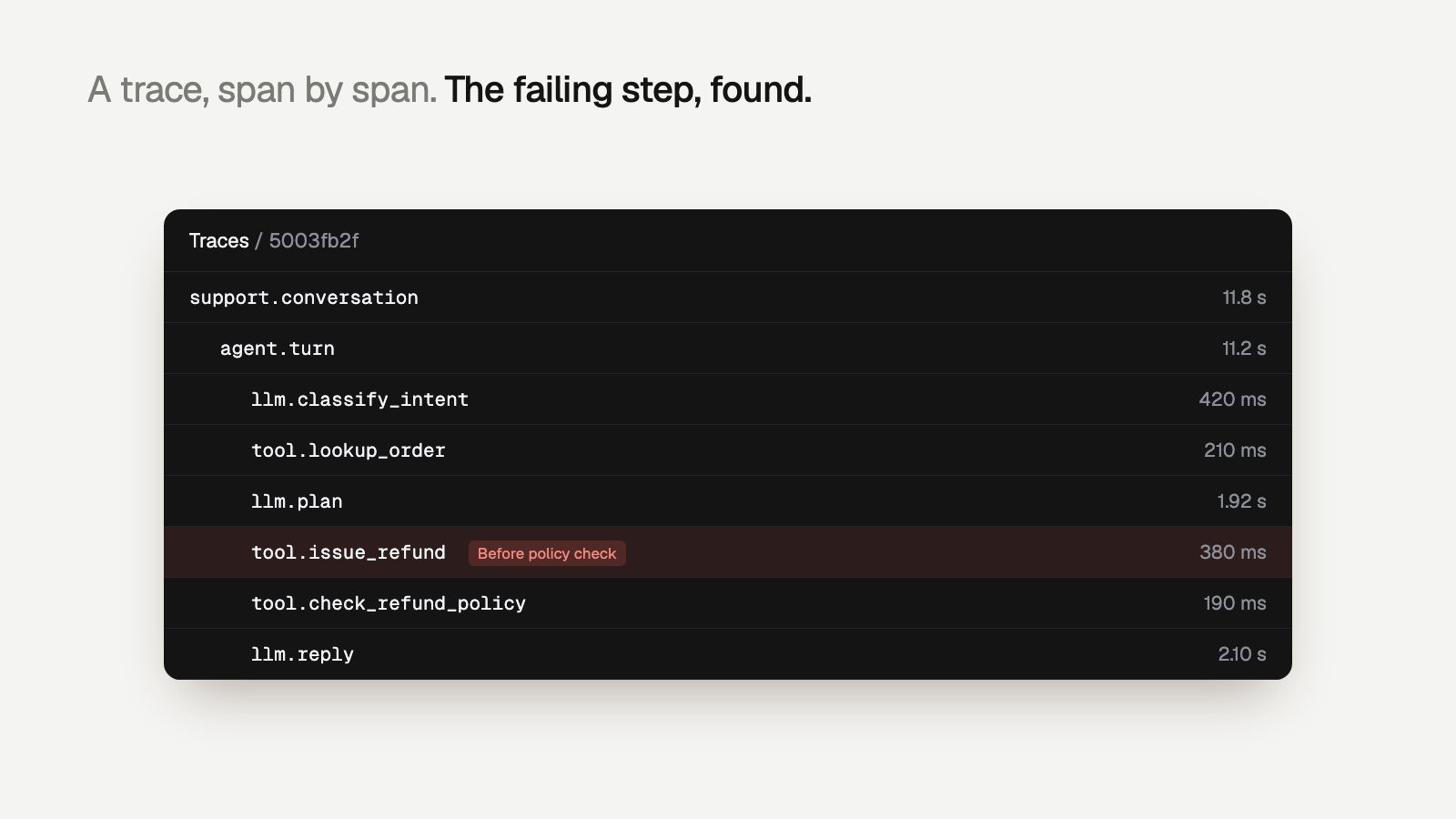
The six tool-call failures
1. Wrong tool chosen
The model picks search_orders when it needed get_order, or calls cancel_subscription when the customer asked to pause. This usually comes from overlapping tool descriptions or too many tools in one prompt.
Detect: map intents to allowed tools and flag calls outside the map, or flag tool sequences that never appear in good traces. For fuzzier cases, a semantic check that compares the user's request with the chosen tool.
2. Malformed or invalid arguments
JSON that does not parse, a missing required field, "amount": "49.99" as a string, an order id with the wrong prefix, a date in the future. Some of these throw. Many do not: the tool returns an empty result and the agent carries on.
Detect: validate every call's arguments against the tool's JSON schema, and add business rules the schema cannot express (refund amount not greater than the order total).
3. Skipped required tool
This is the expensive one. The policy says: check eligibility, then refund. The agent sees an upset customer and a clear order id, and calls issue_refund directly. The order is 45 days old. Every span is green.
Detect: an ordering check. For each action tool, list the tools that must succeed before it in the same trace, and fail the trace if the action comes first.
4. Tool output ignored
The policy tool ran and returned eligible: false. The agent refunded anyway, or told the customer the refund was approved. The tool worked; the model did not listen. This also shows up as answers that contradict retrieved data.
Detect: compare tool results with later actions and the final answer. Structured results make this a code check; free-text results need a semantic check.
5. Retry loops
A tool returns a validation error. The model tries again with the same arguments. And again. Each attempt costs tokens and latency, and the trace can end at the iteration limit with no answer.
Detect: count identical (tool, arguments) pairs per trace, and flag traces that hit the step limit.
6. Timeouts and rate limits
Downstream APIs time out, return 429, or are down. The agent may invent an answer rather than admit the tool failed, which turns an infrastructure problem into a correctness problem.
Detect: tool span errors and latency over a threshold, grouped by tool and upstream status code. Then check whether the final answer acknowledged the failure.
Code checks for tool calls, on every trace
Most of these checks are a few lines of code over the span list. Here is a sketch, independent of any vendor, assuming each span exposes its attributes and status:
And the check for ignored output, which reads tool results instead of just names:
Checks like these take microseconds and cost nothing per trace, so there is no reason to sample. Rare failures, like one bad refund in every few thousand traces, are exactly what a 5% sample misses. See trace sampling vs full coverage for the arithmetic.
Worked example: the out-of-policy refund
Say the support agent handles 20,000 traces a day and issues about 1,500 refunds. After a prompt change meant to make it "more empathetic", check_required_before starts failing on some traces. Grouped together, the failing traces share a pattern:
- The customer message mentions a damaged item and uses strong language.
- The agent calls get_order, then goes straight to issue_refund.
- check_refund_policy never appears in the trace.
- Several of the orders are older than 30 days.
The root cause is the new prompt line telling the agent to "resolve damaged-item complaints quickly". The fix has three layers: revert or reword that line, add the dependency to the issue_refund tool description, and add a guard so the refund cannot execute without a passing policy check. The guard is what makes the failure impossible rather than rarer.
How to fix tool-call failures
Tighten the tool schemas
Schemas are the cheapest fix for bad arguments and wrong tool choice. Use enums instead of free strings, patterns for ids, integer cents instead of float amounts, additionalProperties: false, and descriptions that say when to call the tool and what must come first.
Also cut the tool list. If the agent has 30 tools and a given flow needs 5, expose the 5. Fewer, clearly separated tools reduce wrong choices more than any prompt wording.
Change the prompt, then verify on traces
Prompt changes help with ordering and with using tool output: "Never promise a refund until check_refund_policy returns eligible=true." Version every prompt and record the version on each trace, so you can compare the failure rate of the check before and after the change instead of guessing.
Add guards in code
For anything that moves money, deletes data or contacts a customer, do not rely on the model. Put a guard between the model and the tool that enforces preconditions and returns a clear message the model can act on:
Other useful guards: retry transient errors with backoff inside the tool (not through the model), cap identical calls per trace, return structured errors ({"ok": false, "error": "order_not_found"}) instead of empty results, and tell the model explicitly when a tool is unavailable so it says so to the user.
Where Trodo fits
Trodo is built for this loop. It records every trace with its tool spans, then checks every production trace as a decision tree: code checks first (did a tool call fail, were arguments valid, did the policy tool come before the refund), then semantic checks, then Trodo's own models, with an LLM judge only for what those cannot settle. Failing traces that share a cause are grouped into one issue with the failing step, the evidence and the affected users, and each issue comes with a proposed fix, such as a system prompt change, that ships as a version you can roll back in one click.
That is what agent observability should mean for tool calls: not a chart of error rates, but the specific broken step and a fix. Orbt, for example, checks 100% of its production traces and went from days to under 4 hours between an error and a shipped fix.
Getting started
This week: make every tool call a span with arguments and outcome, write the four code checks above for your most dangerous tool, and add one guard in front of it. Then read the traces that fail.
To have those checks applied to every trace and grouped into issues automatically, sign up for Trodo and follow the tracing quickstart. The Developer plan is free forever, and every feature is on every plan; see pricing.