Self-Improving Agents: Turn Agent Evaluation Into Fixes
A practical loop for continuous improvement of LLM agents: checks on every trace, issues, root cause, replayed fixes, human approval and reversible versions.
A self-improving agent is not an agent that rewrites itself unsupervised. It is an agent inside a loop: production failures are detected, grouped, explained, fixed, tested against the traces that failed, and shipped as a change you can undo. Each pass through the loop leaves the agent better and the checks sharper.
Most teams already have pieces of this. They have traces. They have a few checks written before launch. They fix bugs when a customer complains. What they lack is the connection between those pieces, so the same failure comes back after the next prompt edit and nobody notices for a week.
This article gives you the full loop, step by step, with the controls that keep it safe: human approval, protection against overfitting to a handful of traces, and a way to measure whether a fix actually held. It works with any stack. We show where Trodo fits near the end.
The loop in seven steps
Strip away the hype and a self-improving agent is continuous improvement for LLM agents with a short cycle time. Agent evaluation stops being a report you read and becomes the input to the next change. Seven steps:
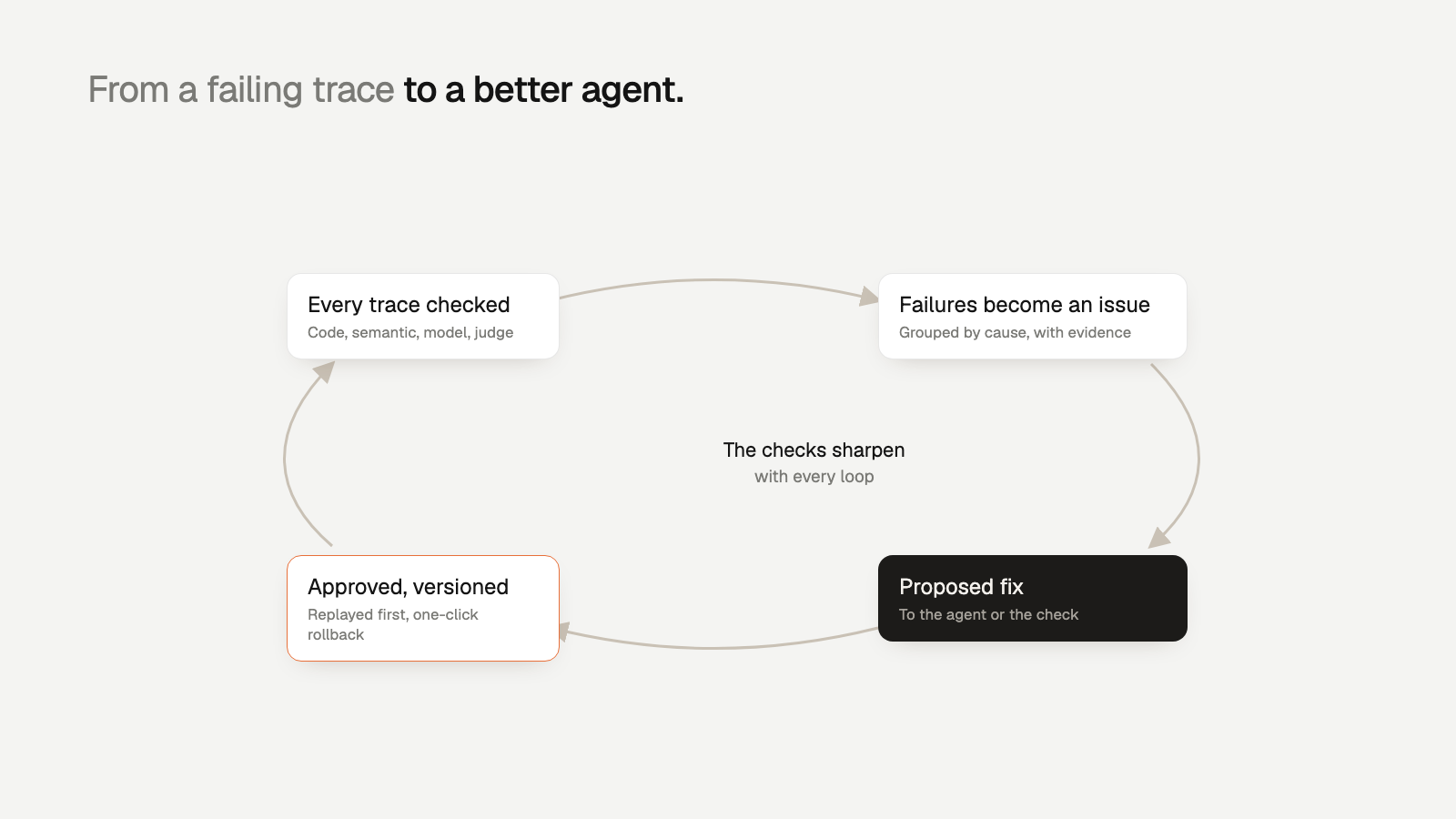
- Detect: apply checks to every production trace.
- Group: cluster failures that share a cause into issues.
- Root cause: find the step in the trace where things first went wrong.
- Propose a fix: a change to the prompt or agent, or a change to the check if the check was wrong.
- Replay: test the fix against the traces that failed, plus traces that passed.
- Ship: release it as a versioned, reversible change after a person approves it.
- Sharpen: the failing traces become test cases, and the check that caught them gets more precise.
The loop is only as fast as its slowest step. For most teams that step is detection: they find out from a support ticket. So start there.
Throughout this article we use one example: a customer-support agent that issues refunds. It sometimes refunds an order outside the 30-day policy, because it calls issue_refund before it calls the policy tool.
Detect and group: from failing traces to issues
Check every trace, not a sample
Agent evaluation in production means scoring live traces, not a fixed test set. Sampling 5% sounds reasonable until you see how rare the costly failures are. Say your refund agent handles 20,000 conversations a day and 0.3% of them refund an order outside the policy window. That is 60 bad refunds a day. A 5% sample shows you about three, mixed in with a thousand passing traces, and they are easy to dismiss as noise.
Good checks for the loop are specific and tied to a step in the trace. For the refund agent:
- Code check: did the agent call issue_refund before get_refund_policy? A pure ordering check on the span tree.
- Code check: was the order placed more than 30 days before the refund?
- Semantic check: does the reply to the customer match what the tools actually did?
- Model-based check: did the agent follow the escalation policy for disputed orders?
Put cheap checks first and send only the traces they can't decide to the expensive ones. That ordering is what makes 100% coverage affordable. Evaluating every agent trace covers the economics in more depth.
Group failures that share a cause
A list of 60 failing traces a day is not actionable. One issue is. Group failures on signals like these:
- The check that failed and the span where it failed.
- The tool call sequence leading up to it, for example lookup_order then issue_refund with no policy call in between.
- Input features: channel, customer tier, language, order age.
- The prompt and model version active when the trace happened.
Each issue should carry a first-seen date, a count, a trend, the affected users, and two or three representative traces as evidence. Now you have one thing to fix instead of 60.
Find the root cause, then propose a fix
The root cause is the earliest step where the trace went wrong, not the step where the damage showed up. The bad refund is the symptom. Open a few trace trees and a pattern appears: when the customer writes "I was told I could get a refund", the agent skips the policy tool and goes straight to issue_refund. The system prompt says "resolve refund requests quickly" and says nothing about checking policy first.
Questions that get you to the cause:
- What is the first span where this trace diverges from a passing trace with a similar input?
- Did a tool return an error or an empty result that the agent ignored?
- Did the prompt, model or a tool change around the time the issue first appeared?
- Is the check itself wrong? Sometimes the failure is the check misreading a valid trace.
That last question matters. Some issues will be the check's fault. Treat that as a normal outcome of the loop.
Fixing the agent
Usually this is a change to the system prompt, a tool description, or the order of steps. For the refund agent: "Before calling issue_refund, always call get_refund_policy with the order ID. If the order is outside the policy window, do not refund. Explain the policy and offer escalation." A fix that edits one instruction is easier to verify than one that restructures the whole prompt.
Sometimes the right fix belongs in code: make issue_refund reject orders older than 30 days at the tool level. Guardrails in code do not drift with the next model update. When money moves, do both.
Fixing the check
If the check flagged traces that were fine, fix the check. Example: the date check counted days from the order date, but the policy counts from the delivery date. Correct the check, rescore the affected traces, and close the issue as a check fix. A check with false positives teaches everyone to ignore it, and that breaks the loop.
Proposals can come from an engineer or from a model that has read the issue evidence. Either way, the proposal is a draft. It does not ship until it passes replay and a person approves it.
Replay against failing traces without overfitting
Replay means executing the agent again, with the proposed change, on the inputs from real traces. Tool responses are either stubbed from the original trace or served live from a sandbox. Then you score the new outputs with the same checks.
The obvious test set is the failing traces from the issue. The fix should pass them. But that alone is how you overfit. A prompt tuned to five traces might say, in effect, "if the customer mentions being told they could get a refund, check policy". It fixes those five and misses the sixth customer who phrases it differently.
A replay set that catches overfitting has three parts:
- The failing traces you read while writing the fix. Most of them should flip to pass.
- Held-out failures: failing traces from the same issue that you did not look at. If the fix only works on the traces you read, it is overfit.
- A regression set of passing traces across other intents: order status, address changes, cancellations. The fix should not break them.
The thresholds are illustrative. Set yours by stakes. Model output varies between calls, so replay each trace more than once and count it as passing only if it passes every time. For anything that moves money, read every regression by hand.
Ship with human approval as a reversible version
A fix that passes replay still needs a person to approve it. The approver should see everything in one place and decide.
Ship the change as a version: prompt text, model, tool config and check config together, with an ID that is recorded on every trace produced after the change. This gives you two things. You can compare pass rates before and after on real traffic. And you can roll back in one step if the fix misbehaves.
Rollback speed matters more than teams expect. Zeebu rolls back a bad prompt in 3 minutes instead of 40. When a change is hurting customers, those 37 minutes are real refunds and real tickets.
Measure whether the fix held, then sharpen the check
Shipping is not the end. Watch the issue after release:
- Issue rate: failures per 1,000 traces for this issue, before and after the version. It should drop close to zero and stay there.
- Recurrence: does the issue reopen within a week or two? A new phrasing of the same request often slips past the fix.
- Side effects: pass rates on the other checks for the same agent. A stricter refund prompt may push more conversations to escalation. That may be fine, but you should see it.
- Cost and latency: an extra tool call on every refund adds a little of both.
A worked example. Before the fix: 60 policy violations a day out of 20,000 traces, or 3 per 1,000. Version 14 ships. The next three days show 2, 1 and 0 violations. On day nine the issue reopens with 4 failures, all in Spanish conversations, where the new instruction is followed less reliably. That is a new issue with a narrow cause, and it goes back into the loop.
Then sharpen. The failing traces join the regression set, so every future change is replayed against them. If the check had false positives, its corrected version is now the one in production. Failures become tests, and tests guard the next change. That is the part that makes the agent improve over time rather than oscillate.
Cycle time is where this shows. Orbt checks 100% of its production traces and cut the time from error to shipped fix from days to under 4 hours.
Where Trodo fits
You can build this loop yourself with a tracing library, a scoring job, a clustering script and a prompt registry. Trodo does it as one system:
- It records every trace and evaluates every production trace with checks ordered as a decision tree: cheap code checks first, then semantic checks, then Trodo's own models trained for calibrated pass/fail decisions, with an LLM judge only for the traces those can't settle.
- Failures that share a cause become issues with the failing step, evidence and affected users.
- Each issue comes with a proposed fix, either to the agent (for example its system prompt) or to the check.
- Approved fixes ship as versions that can be rolled back in one click.
A person stays in charge of what ships. Trodo shortens the distance between a failing trace and a reviewed fix.
Getting started
Start with one agent and one check you already care about. Instrument the agent, score every trace, and let the first issue come to you. Then take it through the loop once, by hand if you need to. Sign up for the free Developer plan, or see pricing for Pro.