Offline vs Online LLM Evaluation for Agents: Use Both
Offline datasets catch regressions before release. Online checks catch what users actually hit. Here is what each misses and how production failures should feed your regression suite.
Most teams start LLM evaluation with a dataset: a few hundred inputs, the behavior you expect, and a script that scores the agent before each release. Then the agent ships, real users arrive, and failures show up that the dataset never imagined.
The other half is online evaluation: checks on live production traces. It sees what users actually send, but it only tells you after a user has already hit the problem. Neither half is enough on its own.
This article explains what offline and online evaluation each catch and miss, how to split effort between them for an agent in production, and how to turn every production failure into a regression test so the same bug never ships twice.
Offline and online evaluation, defined
Offline evaluation means scoring your agent against a fixed dataset in a test environment. You choose the inputs, often write down the expected behavior, and execute the agent against every case before a change ships: a new system prompt, a model upgrade, a new tool. When the goal is to catch things that used to work and now don't, this is LLM regression testing.
Online evaluation means attaching checks to production traces. Every trace the agent produces for a real user gets scored after the fact: did a tool call fail, was the answer grounded in the retrieved documents, did the agent follow policy. The inputs are whatever users send.
The two differ on almost every axis:
- Inputs: offline uses cases you picked. Online uses what users actually ask, in the order and phrasing they actually use.
- Timing: offline happens before a change reaches users. Online happens continuously, after.
- Ground truth: offline cases can carry an expected answer. Production traces usually have none, so online checks judge behavior against rules, context and policy.
- Cost of a miss: an offline miss lets a bad release out. An online miss leaves users affected until someone notices.
- Question answered: offline answers "did this change make things worse on cases we know about?" Online answers "what is going wrong right now, including cases we never thought of?"
What offline evaluation catches and misses
What it catches
- Regressions on known cases after a prompt edit, including side effects in parts of the prompt you didn't touch.
- Behavior changes when you swap or upgrade the model.
- Breakage from a changed tool schema or a renamed parameter.
- Fair comparisons: two versions scored on identical inputs, so a difference in pass rate is caused by the change, not by traffic.
What it misses
- Drift in inputs. Users change how they ask. New products launch. The dataset stays frozen at the moment someone wrote it.
- Real data behind the tools. A test fixture returns clean order records. Production returns orders with missing fields, partial refunds and odd dates.
- Long and messy conversations. Most datasets are single-turn or short. Real users switch topics halfway through.
- Rare combinations. A dataset of 200 cases cannot cover the thousands of ways real requests combine intents, edge cases and tool results.
Take a customer-support agent that issues refunds. The dataset has 40 refund cases. Some are inside the 30-day window, some clearly outside it, and in each the agent calls the policy tool first. It passes all 40. In production a user writes: "The item arrived broken, I only opened it today." The order is 34 days old. The agent, focused on the damage claim, calls the refund tool before it calls the policy tool and refunds an order outside policy. Nothing in the dataset looked like that message, so offline evaluation had no way to see it.
What online evaluation catches and misses
What it catches
- Failures on real inputs, including phrasings and intents nobody predicted.
- Failures that depend on live data: real orders, real documents, real tool latency and errors.
- Slow drift in quality after a vendor updates a model behind the same name.
- Rare but costly failures, as long as you check every trace rather than a sample.
What it misses
- Anything before it ships. Online evaluation reports damage after users have seen it. It cannot gate a release.
- Exact correctness where no reference exists. Without an expected answer, checks judge behavior, grounding and policy, not whether the reply matches a gold answer.
- Controlled comparisons. Traffic changes day to day, so a shift in pass rate after a release mixes the effect of your change with the effect of new users.
- Failures outside the sample. If you only check 1 to 5% of traces, rare failures often never appear. The math is in trace sampling vs full coverage.
Worked example: one release, both layers
Here is how the two layers play out on a single change. The numbers are illustrative.
- The team edits the refund agent's system prompt to make replies shorter. In the process they remove a line: "Always check the refund policy before issuing a refund."
- The offline suite has 200 cases. The pass rate moves from 96% to 97%, because shorter replies score better on tone checks. The change ships.
- The agent handles about 8,000 traces a day, of which about 600 are refund requests. An online check, policy_before_refund, scores every one of them.
- Before the release that check failed about 2 times a day. After it, it fails about 18 times a day, or 3% of refund requests.
- Grouping the failures shows a single cause: nearly all involve damaged-item claims on orders older than 30 days. The removed prompt line was the only thing stopping the agent from jumping straight to the refund tool on those messages.
- The fix restores the line. Before shipping it, the team adds 10 of those failing traces to the offline dataset and confirms the old prompt fails them and the new prompt passes.
Offline evaluation said the release was fine because the dataset had no late damaged-item cases. Online evaluation found the problem within a day. Feeding the failures back means the next prompt edit that makes the same mistake gets stopped before it ships.
How production failures should feed the offline dataset
The most valuable offline cases are the ones production already proved your agent can fail. A dataset written only from imagination tests the problems you expected. One grown from production traces tests the problems you actually have.
A method you can apply with any tooling:
- Group failures by cause first. Eighteen failing traces with one cause are one issue, not eighteen test cases.
- Pick 3 to 10 representative traces per issue. Choose different phrasings and edge values, not near-duplicates.
- Remove personal data from inputs and tool results before the trace becomes a test.
- Freeze the tool responses recorded in the trace, so the case is deterministic and doesn't depend on a live order system.
- Write the expectation as a check, not an exact string. "Policy tool called before refund tool" survives prompt rewrites. A golden reply does not.
- Tag each case with the issue it came from and the date, so you know why it exists.
- Confirm the case fails on the old version and passes on the fix. A regression test that never failed proves nothing.
- Prune on a schedule. Retire duplicates so the whole suite stays fast enough to execute on every change.
Use the same check in both places
Notice that policy_before_refund is one function. It scores the frozen case offline and every live trace online. Keeping one definition means a fix to the check applies to both layers, and a pass offline means the same thing as a pass in production.
How to split effort between offline and online
- Before first launch: mostly offline. Write 50 to 100 cases that cover the main intents and every policy edge you know about, like the 30-day refund window.
- First weeks in production: shift weight online. This is when most new failure modes appear, so check every trace and review issues daily.
- Steady state: offline gates every change to the prompt, model or tools. Online covers all traffic. Once a week, move newly confirmed issues into the dataset.
- Model upgrades: score the full offline dataset first, then release to a slice of traffic and compare online pass rates before rolling out further.
For a broader view of which checks to write in the first place, see the agent evaluation guide.
Where Trodo fits
Trodo covers the online half and the handoff back to offline. It records every trace your agent produces, with spans, LLM calls, tool calls, tokens, cost and latency, as part of its agent observability. It then evaluates every production trace, not a sample. Checks work as a decision tree: cheap code checks decide first, then semantic checks, then Trodo's own models trained for calibrated pass/fail decisions. An LLM judge only sees the traces those can't settle, which keeps checking everything at a fraction of LLM-judge cost.
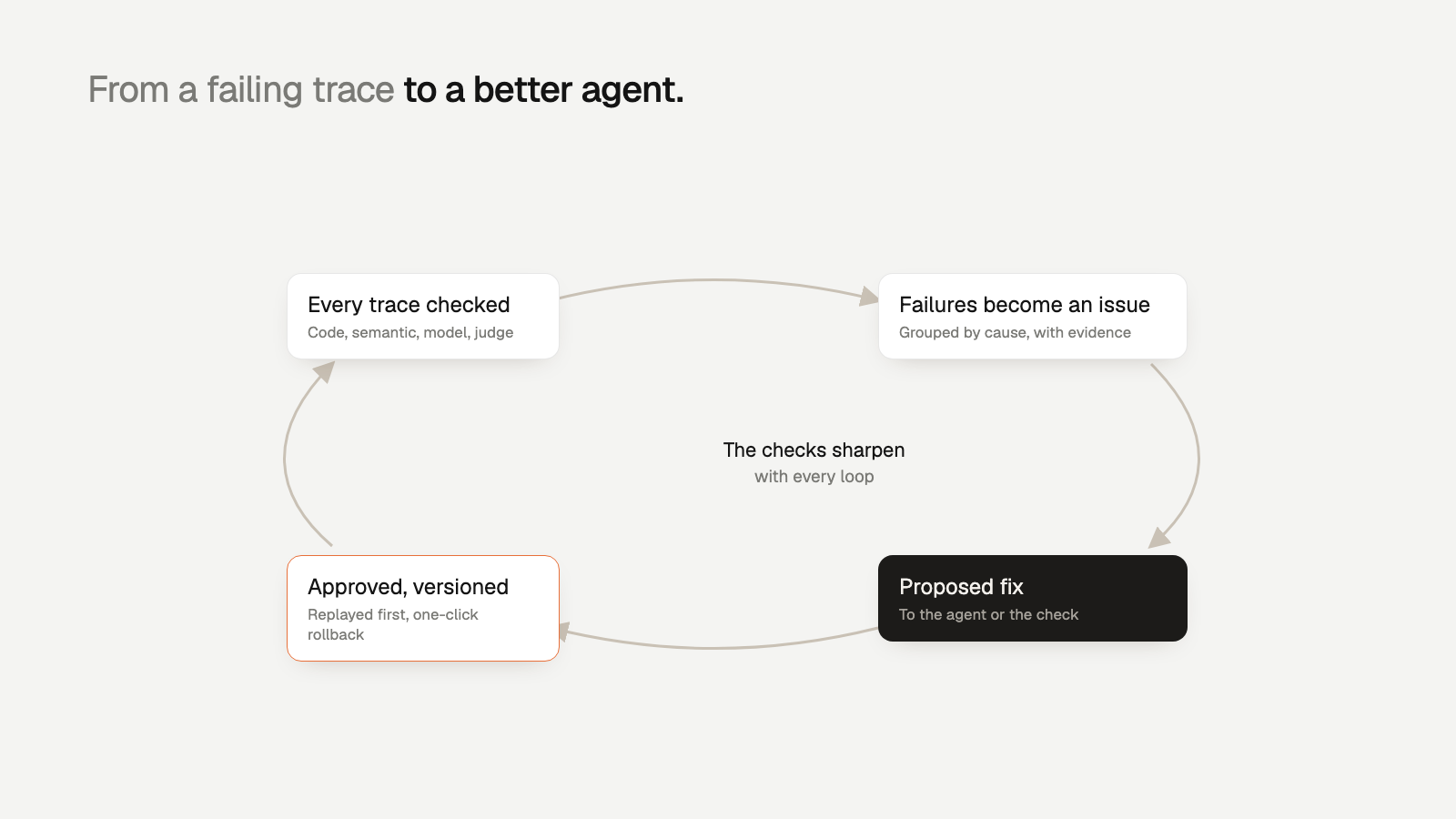
Failures that share a cause are grouped into issues with the failing step, the evidence and the affected users. Those grouped traces are exactly the raw material the method above needs. Each issue also comes with a proposed fix, either to the agent's system prompt or to the check itself. Approved fixes ship as versions you can roll back in one click. Zeebu rolls back a bad prompt in 3 minutes instead of 40, and Orbt checks 100% of its production traces and cut the time from error to shipped fix from days to under 4 hours.
Getting started
Start small on both sides this week. Offline: write 50 cases covering your main intents and known policy edges, and score them on every prompt change. Online: instrument your agent, attach two or three checks that encode your hardest rules, and look at what fails. Then move the first confirmed production failure into the dataset.
You can create a Trodo account and send traces in a few minutes. The Developer plan is free forever, and every feature is on every plan; see pricing for limits.