Agent Evaluation in Production: A Practical Guide
What to measure, which checks to use, how to build datasets from production traces, where to set thresholds and how to turn failures into fixes. A practical guide to agent evaluation.
Most teams test their agent before launch with a few dozen hand-written cases, ship it, and then find out what it actually does from customer tickets. The pre-launch tests pass. Production is where the agent meets inputs nobody wrote down.
Agent evaluation in production closes that gap. It means scoring the agent's real traces against what "good" looks like, continuously, and acting on what fails. Done well, it tells you within hours that a prompt change broke refunds for one intent, instead of weeks later.
This guide covers what to measure, the four types of checks and when to use each, how to build datasets from production traces, how to set thresholds and alerts, and how to turn failures into fixes. The method works with any tooling. We show where Trodo fits near the end.
What to measure: six agent evaluation metrics
An agent can fail in more ways than a chatbot, because it takes actions. Measure each dimension separately, so a drop in one is not hidden by the average of the others.
Task completion
Did the agent do what the user asked? For a refund agent: was the refund issued, or correctly declined with a reason? This is the metric closest to business value. Define it per intent, because "complete" means something different for a refund, an order lookup and an address change.
Tool correctness
Did the agent call the right tools, in the right order, with the right arguments? Our running example: a customer-support agent that sometimes calls issue_refund before check_refund_policy, and refunds orders outside the 30-day window. The final message looks fine. The tool sequence is wrong.
Grounding
Is every factual claim supported by a tool output or retrieved document in the same trace? Ungrounded numbers, like an invented delivery estimate, are the most common form of hallucination in agents.
Policy compliance
Did the agent follow your rules: refund windows, data access, what it may promise, topics it must avoid? Policy failures carry the highest cost per incident, so they deserve the strictest checks.
Tone and helpfulness
Was the answer clear, appropriately brief and on brand? Did the agent give up on a request it could handle? This dimension is subjective, so it needs clear rubrics.
Cost and latency
Tokens, dollars and seconds per trace, broken down by intent and agent version. A change that improves task completion by 1% while doubling cost may not be worth shipping. These come straight from the trace, no judgment needed.
Four types of checks
Each metric above needs a check that returns pass or fail with a reason. There are four kinds, and they differ by orders of magnitude in cost.
- Code checks. Deterministic functions over the trace. Did a tool call return an error? Was check_refund_policy called before issue_refund? Is the refund amount at or below the order total? Free, instant and exact. Use them for anything you can express as a rule.
- Semantic checks. Compare meaning, usually with embeddings or a small classifier. Is the answer's delivery estimate present in the tool output? Does the user's next message look like a correction? Cheap and fast, good for grounding and intent.
- Model-based checks. A model reads the trace and decides against a rubric. This covers tone, helpfulness and nuanced policy. The common form is an LLM judge. It is flexible but costly at volume and needs calibration.
- Human review. A person labels the trace. Slowest and most expensive, but it is your ground truth. Use it to calibrate the other three and to settle disputes, not to cover volume.
The mistake teams make is picking one type for everything. Sending every trace to a frontier LLM judge works at 500 traces a day. At 50,000 a day, the bill grows with volume and you start sampling, which means you miss rare failures.
Order checks as a decision tree
Arrange checks so the cheapest one that can decide goes first. Most traces are settled by code or semantic checks. Only the ambiguous ones move on to a model, and only the hardest reach a human.
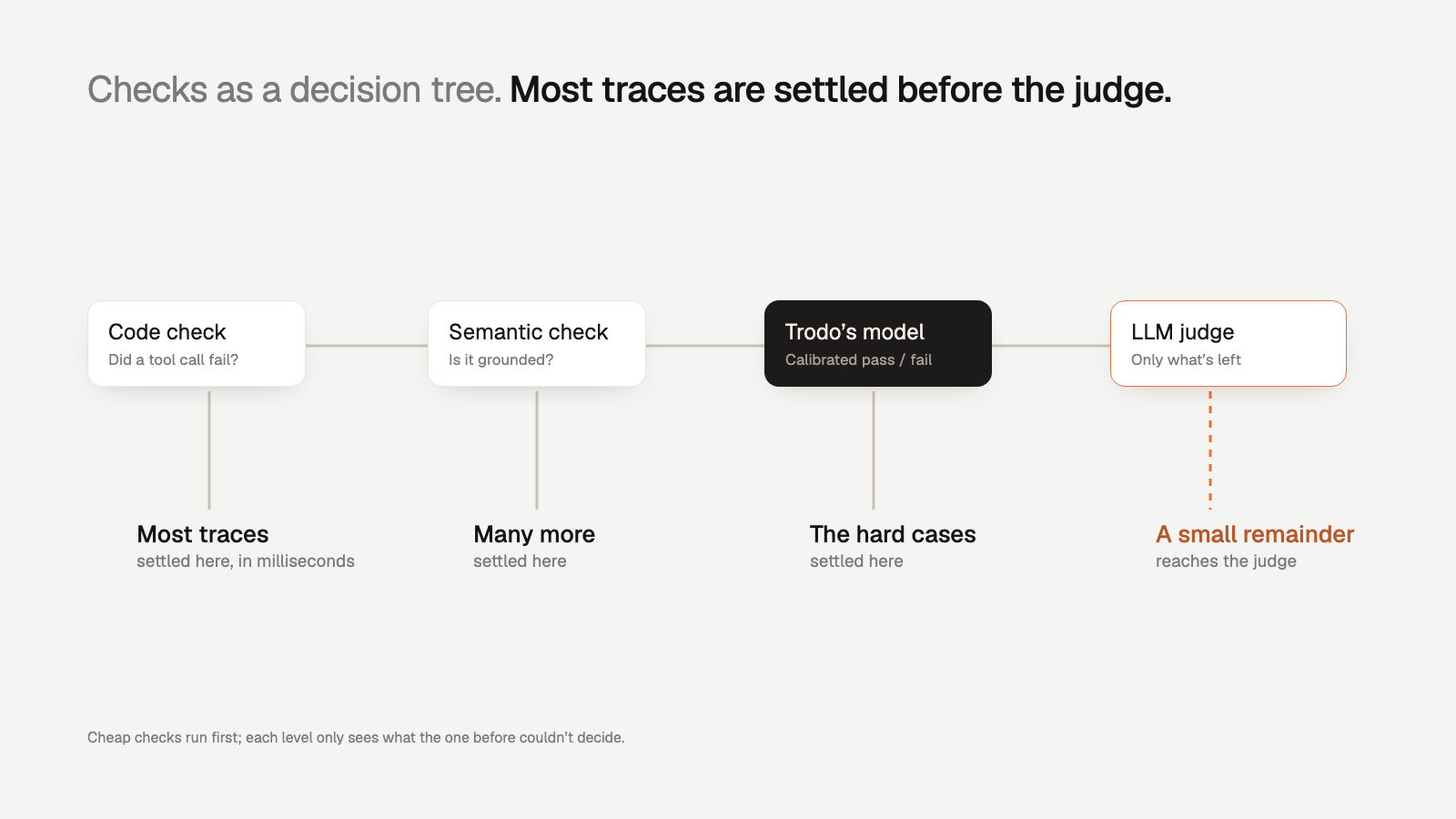
For the refund agent, the tree looks like this:
- Code: was issue_refund called? If not, the policy check passes and the trace moves to other checks.
- Code: was check_refund_policy called first, and did it return eligible: true? If it returned false and a refund went out anyway, fail. Done.
- Semantic: do the amounts and dates in the reply match the tool outputs? Clear match passes, clear mismatch fails.
- Model: for replies that mention exceptions ("as a one-time courtesy..."), does the explanation fit the policy text? Only a small share of traces reach this step.
This ordering is what makes it affordable to evaluate every agent trace instead of a sample.
Build datasets from production traces
Hand-written test sets drift away from reality within weeks. Your best dataset is your own production traffic, curated.
- Start with failures. Every trace that failed a check or triggered a user correction is a candidate. Label it with the correct outcome.
- Add hard passes. Traces that nearly failed, or that an LLM judge was unsure about, teach you where the boundary is.
- Balance by intent. If 70% of traffic is order status, a random slice will underweight refunds. Sample each intent separately.
- Freeze versions. Keep a dated snapshot so you can compare agent versions on the same inputs.
- Refresh monthly. Add new failure clusters as they appear, retire cases that no longer reflect how users talk.
This dataset has two jobs. It is your regression suite before a release, and it is the labeled data you use to check that your checks agree with humans. We compare the two modes in offline vs online agent evaluation.
Thresholds and alerts
A check score is only useful if someone acts on it. Set thresholds per metric and per intent, based on a baseline week.
- Hard rules alert on any failure. A refund outside policy is one too many. Alert on the first occurrence.
- Rates alert on change. Task completion at 94% might be normal. Alert when it drops more than a few points below its 7-day baseline for an intent.
- Volume-aware thresholds. A 10% failure rate on 20 traces is noise. Require a minimum count before firing.
- Per-version comparisons. After a release, compare the new version's pass rates against the previous one on the same intents.
- Cost ceilings. Alert when average cost per trace for an intent crosses a set number, which often signals a loop or a retry storm.
Route alerts to where the owning team already works. An alert that lands in a channel nobody reads is the same as no alert.
Worked example: a prompt change that broke refunds
Say your support agent handles 20,000 traces a day, 3,000 of them refunds. On Tuesday you ship a prompt change to make the agent more concise. It trims the paragraph that reminded the agent to check the policy first.
Wednesday morning, the numbers read like this. Task completion for refunds: up from 91% to 93%, because the agent now refunds more often. Latency: down. Cost: down. Every top-line metric improved. The refund policy code check tells a different story: failures went from near zero to 140 in a day, all on the new version, all with the same missing tool call.
Without a policy check on every trace, this change looks like a win. With it, you roll back by noon and write a better prompt, plus a regression case for your dataset. The example also shows why metrics must be measured separately: task completion alone rewarded the bug.
Turn failures into fixes
Finding failures is half the job. The loop that matters is trace, check, issue, fix, better checks.
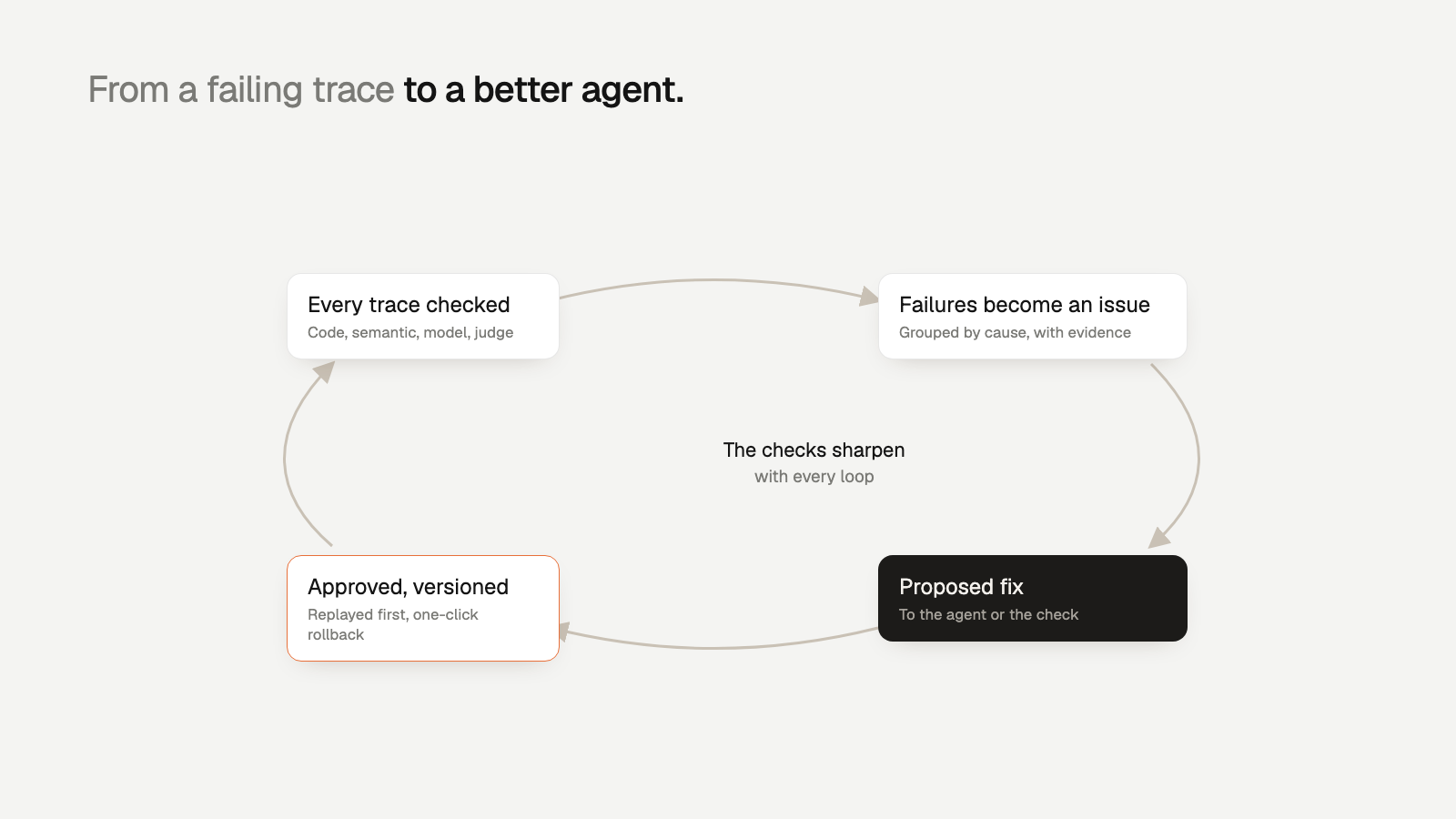
- Group by cause. 140 failing traces with the same missing tool call are one issue. Group by check, failing step and agent version.
- Find the failing step. Look at the span where the trace went wrong, not just the final answer.
- Fix the agent or the check. Sometimes the prompt is wrong. Sometimes the check is too strict and needs a new rubric.
- Version every change. Ship prompt and check changes as versions you can compare and roll back.
- Add the case to your dataset. Every fixed issue becomes a regression test.
This is where agents start to improve from their own production data.
Where Trodo fits
Trodo is an agent evaluation and observability platform that implements this loop. It records every trace through Python and Node.js SDKs, OpenTelemetry ingest or auto-instrumentation for frameworks like LangChain and LlamaIndex. It evaluates every production trace with checks ordered as a decision tree: code checks, then semantic checks, then Trodo's own models trained for calibrated pass/fail decisions, with an LLM judge only for what those cannot settle. That keeps full coverage at a fraction of LLM-judge cost.
Failures are grouped into issues with the failing step, evidence and affected users. Each issue comes with a proposed fix to the agent or the check, and approved fixes ship as versions you can roll back in one click. Zeebu rolls back a bad prompt in 3 minutes instead of 40 and saves 8+ hours per developer per week (case study). Alerts fire when a number crosses your threshold.
Getting started
Pick your agent's most important intent. Write one code check for its hardest rule and one grounding check for its most common claim. Apply both to a week of production traces and look at what fails. That alone will tell you more than your pre-launch test set.
To check every trace without building the pipeline yourself, sign up for Trodo. The Developer plan is free forever, and every feature is on every plan. Compare limits on the pricing page.